Configuring Stepped Rates
Last updated: March 20, 2026
A stepped rate is a pricing structure where the rate changes after a specified volume of energy consumption. For example:
The first rate applies to the initial 100 kWh consumed during a billing period.
The second rate applies to consumption between 100 kWh and 200 kWh.
A final rate applies to all consumption exceeding 200 kWh.
A stepped rate must include the following:
At least one configured step.
A final default price.
An appropriate unit of measurement.
Configuring a Stepped Rate
Step 1: Apply the Correct Rate Configuration
To configure a stepped rate, follow these steps:
Select a charge type of Volume.
Select a rate type of Flat.
Select a price type of Stepped.
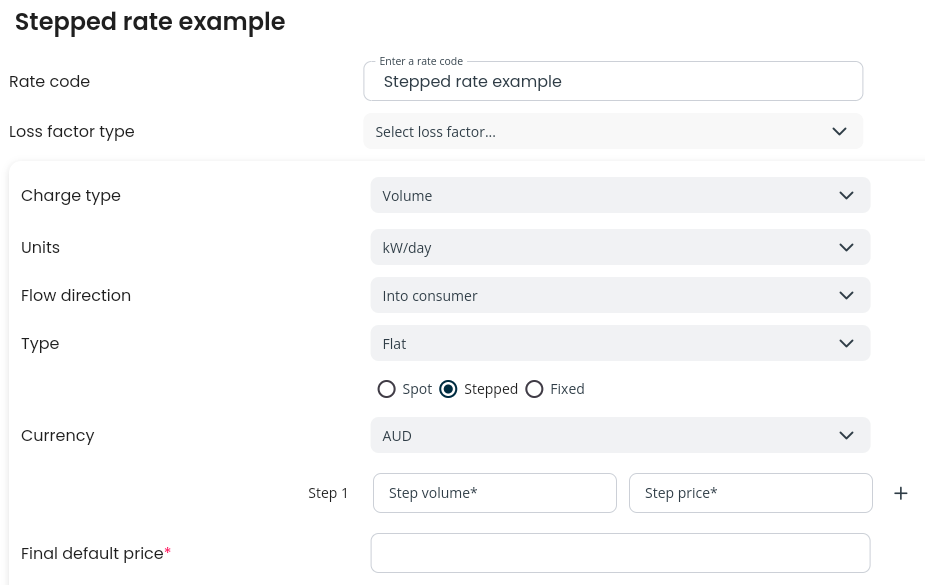
Step 2: Configure the Volume and Price Steps
Enter the volume and price for the first step. The price applies to all volume up to and including the specified amount.
If additional steps are needed, click the + icon and add as many steps as required.
Enter the final default price, which applies to all volume exceeding the last step's volume.
Configuring the Appropriate Units
Stepped tariffs are commonly defined by networks or distributors based on kWh over a year, quarter, month, or day. Since energy bills are typically monthly or quarterly, Factor supports defining stepped rates using the following units:
volume/day
volume/month
This enables stepped charges to be calculated accurately when the rating period is shorter than the tariff period.
Therefore, you will need to convert annual tariff volumes into equivalent daily or monthly consumption values.
For example, if a tariff specifies a price for volumes exceeding 10,000 kWh per year, the equivalent consumption values are:
27.40 kWh per day (10,000 ÷ 365)
833.33 kWh per month (10,000 ÷ 12)
In the case of a leap year, specify a new time-sliced rate for that year and divide the annual volume by 366.